


Sometimes you wanna customize your blog to be par with your expectations and requirements to improve productivity. Or just to enhance the design of your blog. Did you ever find that Blogger comment label is buggy or irritating? Oh... I must have told you before. Comment label is the text displays number of comments published in related to a particular post. Usually it appears on comment section just above comments made on a post. It's just show off the comment count. When it comes to designing or customizing your blog, you may find that there's no setting to customize comment label as you need. However you can customize this label at your template. But do you know how to customize it?
Recently I've got a query from Eugeniu Rubliovschi and he asked "Why the font and size of the number of comments is the same as for the title of the blog post?". He meant that its font size is kinda biggy and he wanna get rid of it. That query made me write this post and I'm very thankful to him. By default, Blogger comment label font is bold and bigger than normal text. So if you find it's buggy, you wanna customize it too. As I mentioned earlier, you can customize comment label by just going through your template. You may not like to touch your template, but as you read on, you will see that it's really simple and you don't wanna be a code-genic to understand it all. However I'm here responsible and doing my best to make it more descriptive and simple for you. Let's customize your comment label too.
Steps:
1. Go to Blogger Dashboard.
2. Click on your Blog Title.
3. Jump to Template tab.
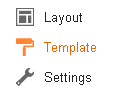
Note: Before editing your template, you may want to save a copy of it. Read How to Back Up Your Template.
4. Now click on Edit HTML button.
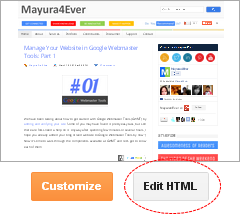
5. Search for below code snippet in your template. This code snippet is responsible for displaying comment label.
Note: You will encounter two code snippets in your template and make sure to apply your changes for both code snippets.
<h4><data:post.commentLabelFull/>:</h4>
6. Now customize your comment label as per your requirements.
Change Comment Label Text
In order to change comment label text, replace the code snippet you found in previous step with the one below, and make necessary changes to reflect in comment label.
<h4>
<b:if cond='data:post.numComments == 1'>
1 <data:commentLabel/>:
<b:else/>
<data:post.numComments/> <data:commentLabelPlural/>:
</b:if>
</h4>
<b:if cond='data:post.numComments == 1'>
1 <data:commentLabel/>:
<b:else/>
<data:post.numComments/> <data:commentLabelPlural/>:
</b:if>
</h4>
<data:commentLabel/> layout tag displays comment text when you have only 1 comment for particular post. It's the singular form. If you have 0 or more than 1 comment for a post, it will make use of <data:commentLabelPlural/> layout tag. <data:commentLabelPlural/> tag displays comments text which is plural form. So replace those tags accordingly with a custom text you wanna show off as the label.
Change Comment Label Font
If you need to change the font and styles of your comment label, locate H4 tags enclosing the code snippet we found in previous step.
<h4><data:post.commentLabelFull/>:</h4>
Then replace <h4> tag with,
<span style="font-size: 12px; color: black">
and </h4> tag with,
</span>
Color Indication Information:
- Font Size
Specify your preferred font size for comment label here.
- Font Color
If you wanna change font color of comment label, specify color name or hex value of color here.
7. Now click Save template button to save changes.
Enjoy :-)

oh thanks, for both, mentioning me and fixing that bug :)
hey don't wanna disappoint you but I've tried this two times, on two different blog and it didn't work.
Sure mate :) Thanks for bringing me that question. Your query made me write this one. Hope it helps :)
Cheers...
Oops... BTW Nothing to disappoint :) Did you made changes for both code snippets in template? Else changes won't reflect.
Cheers...
Got it, didn't to look for two similar codes :) sorry :)
Oops... It's alright mate :) Glad you've made it.
Cheers...
Hello, hello, thanks for this post. I think that because I've previously altered the text of my link to leave a comment (it now says "click here to leave a comment"), I cannot find this in my html editor. I'm looking to give the aforementioned text a bigger font. I found the h4 tags in my html and tried to edit them the way you suggested, but nothing showed up in the preview.
My blog is http://www.chowgypsy.com
Any thoughts?
Thanks!
Hey Meggan,
Oops... Here I'm mentioning about comment label on post page just above comment form which reflects number of comments as "2 comments" or so dear. I think you are talking about the comment link on post footer, right? :)
Cheers...
That's right--so if you're on my homepage reading posts, at the bottom there is a link that says "click here to leave a comment," and that's what i'd like to make larger.
Thanks!
Hi Meggan,
Well... Well... Well... Just add below CSS style in your template just before ]]> line and change font size value as you need,
.comment-link{font-size: 20px;}
Cheers...
ahhh you make it seem SO easy! Thank you!
Owh... You're always welcome Meggan ;)
Cheers...
Hello, thanks for the useful information in this post! I have this comment header below the post, and I would love to replace it with an image. How is this possible?
Hi Anna,
Are you sure about this? :) I mean it suppose to reflect number of comments you have got on the post.
Anyway if it's alright, just remove part of the code from to from above code snippet metioned in the post and place your image HTML tag there.
Cheers...
this isnt working for me :-(
Hi Dimp,
What was you trying to work on ~ Comment label text or font size? :)
Cheers...
Wow! Thanks for the fast response. I was working on the size. On my site (www.dimp-zone.net) the comment label is small and un noticeable. I want to make it bigger and bolder while keeping it in the same position.
I tried the code above, bu when I save it, nothing comes from it. Am I doing something wrong?
You're welcome Dimp :)
I've just had a look but you are using Disqus comment system over there, not Blogger default comment system. So this tutorial not applies for you. Also the comment label on Disqus comment box is visible too.
Cheers...
ooh! i feel so dumb. lol! Would you happen to know any CSS style codes to customize the disqus comment link?
lol :D No worries. Seems currently CSS codes not offered for new version of Disqus. BTW your Disqus comment link inherits the font size of your posts/pages, so I don't feel it's unnoticeable though. Anyway it's rare someone really click on comment link instead of post title :)
Cheers...
Thank you! Now I can stop searching! Lol. That actually makes sense. Because when I come by its never by clicking on the comment link. Lol
Ha ha... You're welcome Dimp :)
As long as it's visible, I think you are alright though it's not being clicked :)
Cheers...
Can't believe it's this simple! Thank you!! I've been pulling my hair out trying to find the right code! But I would really like to customize it further. Could you help me make it look like the one in the attached photo? Pretty pretty please?
Hi Bea,
Glad to hear you could make use of this post dear :) I appreciate your kind words.
Are you looking for changing the color of your comment label? If so, you can see how to in the post.
However the site reflects in your screenshot is on WordPress platform, not Blogger :)
Cheers...
Hello again! Thank you so much for responding. :)
Uhm, I was hoping to make it "0 Comments" instead of "No comments", and to have the number a little bit bigger than the text. Is this doable in Blogger?
Hi Bea,
Really sorry for keep you waiting for a reply dear.
Well, it's possible but the application depends on the code snippet you have in your template.
Did you already follow this post and added the code snippet here? :)
Cheers...
Oh, eek! Not yet!! I will try this. Heehee, thanks a bunch!!
Oh, sorry to hear that!
However, I've noticed few changes in different templates and updated this post with new layout tags using for comment label.
Can you follow the steps again and see if you can make it work? :)
Cheers...
Okay, I will give it another try! :)
Thank you so so much! Please know that I really appreciate your helpfulness, generosity, and patience. :)
Alrighty and you're welcome Bea :) I really appreciate your kind words too.
Just hope you can get it done as you wish :)
Cheers...